
Diga sí a las actualizaciones de software
Las actualizaciones de software a menudo incluyen parches críticos y protecciones contra amenazas de seguridad. Por eso es importante actualizar su sistema, navegador y aplicaciones regularmente. Recientemente hemos observado un aumento en los intentos de fraude que involucran a miembros que utilizan sistemas informáticos obsoletos. Los sistemas operativos más antiguos (como Windows 10 o versiones anteriores de macOS) ya no reciben actualizaciones de seguridad, y eso deja brechas que los delincuentes pueden explotar.
Por qué los sistemas desactualizados le ponen en riesgo
Cada día, los estafadores buscan formas de robar información personal y financiera. Los sistemas operativos modernos reciben actualizaciones de seguridad periódicas que protegen contra estas amenazas. Pero cuando su sistema operativo ya no recibe actualizaciones:
- Las vulnerabilidades conocidas quedan sin corregirse.
- Los hackers pueden instalar malware o robar datos con mayor facilidad.
- Su navegador, antivirus y aplicaciones bancarias pueden no funcionar correctamente ni de forma segura.
Por eso es importante actualizar el software en su ordenador, tablet y teléfono móvil tan pronto como esté disponible una versión más reciente.
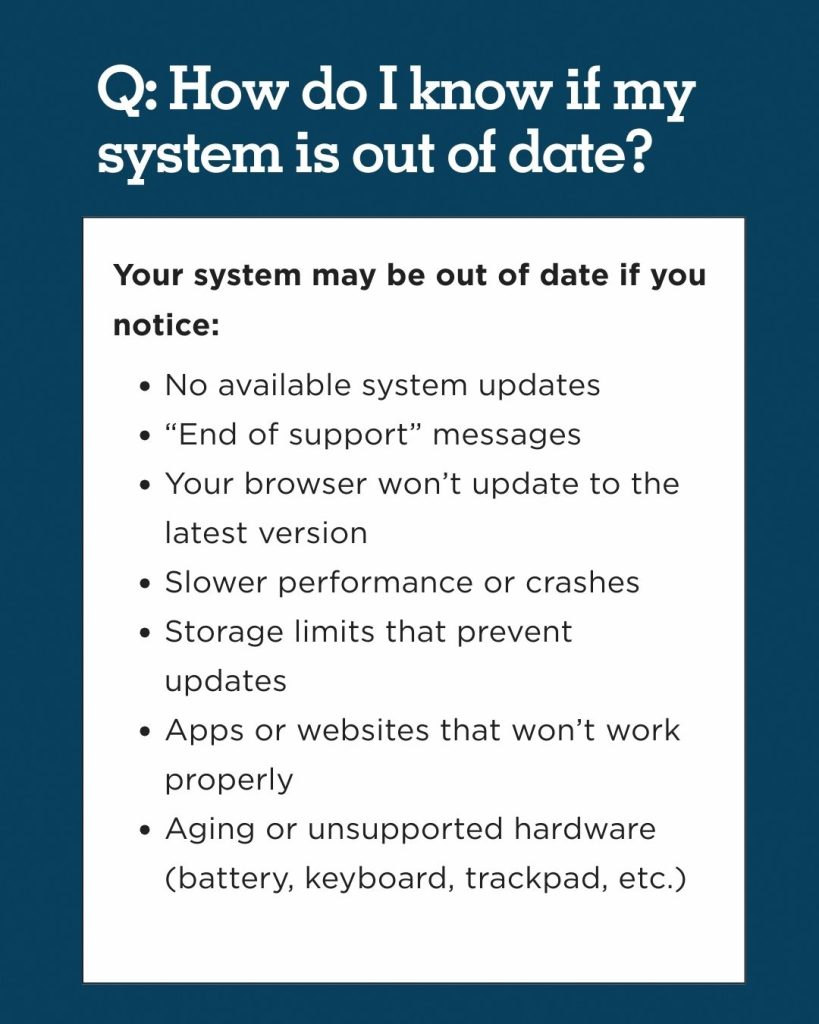
Cómo esto afecta la seguridad de su cuenta
Maps Credit Union y otras instituciones financieras utilizan múltiples capas de protección para ayudar a detectar y prevenir actividades no autorizadas, pero la seguridad de los dispositivos también desempeña un papel importante. Los dispositivos obsoletos pueden facilitar que los estafadores se dirijan a sus credenciales de acceso y a su información personal a través de:
- Páginas de phishing diseñadas para parecer sitios de confianza
- Software que registra las pulsaciones de teclas
- Avisos de actualización maliciosos o falsos
- Conexiones de red no seguras
Mantener su sistema actualizado añade una capa adicional de protección al comprar en línea o al acceder a sus cuentas.
Mantener su sistema al día
Actualizar su sistema operativo y software ayuda a protegerse de problemas de seguridad conocidos.
['1']. Para Windows:
- Vaya a Configuración → Actualización y seguridad → Windows Update
- Elija Buscar actualizaciones e instale
2. Para macOS:
- Abra el menú Apple → Configuración del sistema → Actualización de software
- Instale si está disponible
Si su dispositivo ya no admite actualizaciones, actualizar a un sistema más nuevo es la solución más sencilla a largo plazo.
Qué hacer si no puede actualizar su ordenador
Si reemplazar su ordenador no es una opción ahora mismo, todavía hay formas más seguras de acceder a sus cuentas. Si su dispositivo ya no admite actualizaciones y no puede actualizar a un sistema más nuevo:
1. Utilice un dispositivo móvil seguro en su lugar
Los smartphones y las tabletas más modernas suelen recibir actualizaciones por más tiempo que los portátiles o computadoras de escritorio antiguos. Utilizar un teléfono o una tableta actualizados para acceder a la banca en línea es más seguro que utilizar una computadora anticuada.
- iPhone y iPad con el iOS actual
- Dispositivos Android que ejecutan parches de seguridad recientes
2. Acceda a la banca en línea solo en redes de confianza
Evite usar Wi-Fi público o no seguro al gestionar sus finanzas. Si debe usar Wi-Fi en público, utilice el punto de acceso móvil de su teléfono.
3. Mantenga actualizados los antivirus y los navegadores
Incluso en máquinas antiguas, mantener actualizados el software antivirus y los navegadores web añade otra capa de protección.
Asegure su red Wi-Fi doméstica
Su router es el punto de acceso entre sus dispositivos y el Internet. Si un malware infecta cualquier dispositivo en su red doméstica, puede propagarse a otros dispositivos en la misma red. Para asegurar su red:
- No utilice el nombre y la contraseña predeterminados del router. Muchos routers se envían con credenciales estándar que son fáciles de adivinar. Crear una contraseña única añade una capa importante de protección.
- Utilice un cifrado Wi-Fi fuerte. Utilice la seguridad Wi-Fi más fuerte que soporte su router (a menudo listada como WPA2 o WPA3).
- Mantenga el software de su router actualizado. Las actualizaciones del router solucionan los problemas de seguridad de la misma manera que las actualizaciones de la computadora.
- Limite los dispositivos conectados. Elimine los dispositivos que ya no utiliza y evite conectar dispositivos desconocidos a su red.
- Utilice una red separada para los invitados. Una red de invitados evita que los dispositivos de los visitantes accedan a sus dispositivos y datos principales.
- Reinicie su router de vez en cuando. Reiniciar puede ayudar a aplicar actualizaciones y solucionar problemas temporales.
Más información:
Consulte los consejos de banca segura y prevención de fraude en nuestra biblioteca de seguridad, y explore estos otros recursos para mantenerse un paso por delante del fraude:
Más recursos
- Centro de ayuda y aprendizaje sobre seguridad de Microsoft
- Seguridad de la plataforma Apple
- Consejos de mejores prácticas de la Agencia de Seguridad de Infraestructura y Ciberseguridad (CSIA)
- Video de la FTC sobre cómo proteger su computadora contra malware
- Consejos de seguridad en línea de la Comisión Federal de Comercio (FTC) sobre identificación
- Departamento de Justicia de Oregón
- Guía de la National Cybersecurity Alliance para la seguridad en línea
- Consejos de la FTC para proteger su información personal de los hackers y estafadores